On this page
Key takeaways
- A monthly digital marketing report should cover a summary, leads and sales, channel KPIs, spend, work completed, what was learned and next month's plan.
- One page is enough when it leads with business outcomes: leads, cost per lead and revenue.
- Attribution needs UTM tags, conversion tracking and a CRM stage for every lead.
- Judge results by campaign stage: setup, early signals, then compounding growth.
Quick answer
A monthly digital marketing report should include a short summary, leads and sales by source, two or three KPIs per channel against target, spend and cost per lead, the work completed, what was learned and next month's priorities. It should tie activity to business outcomes, not only reach and impressions.

A good agency report is more than a spreadsheet of numbers. It tells you what happened, why it matters, and what will be done about it. Here's what your monthly report should contain, and how to spot when reporting is designed to impress rather than inform.
The 8 Elements Every Monthly Marketing Report Should Include
A comprehensive monthly report from your agency should contain these eight components. If your current agency doesn't cover all of these, ask why.
- 1. Executive Summary: a 3–5 line plain-English summary of the month's performance for non-marketers
- 2. Channel-by-channel KPIs: performance against agreed targets for each active channel
- 3. Comparison to prior period: month-over-month and year-over-year to show trends
- 4. Leads and conversions: the actual business outcomes, not just traffic
- 5. Spend breakdown, where ad budget was allocated and why
- 6. What was done: deliverables completed this month (content published, campaigns launched, technical fixes)
- 7. Analysis and insights: why did performance improve or decline? What was learned?
- 8. Next month's priorities: what will be done next month and what outcomes are targeted
One-Page Monthly Digital Marketing Report Template
A report does not need to be long to be useful. This one-page structure covers the eight elements above in the order a business owner reads them. Use it as a template, or ask your agency to map its report to it.
| Section | What goes in it | Example line |
|---|---|---|
| Summary | Three to five plain-English lines on the month | Leads up 18% on last month; cost per lead down on Google Ads |
| Leads and sales | Leads by source, qualified leads, sales or revenue where tracked | 62 leads, 41 qualified, 9 closed (CRM) |
| Channel KPIs | Two or three core metrics per active channel against target | Google Ads: 4.1% conversion rate vs 3.5% target |
| Spend | Ad spend and fees by channel, cost per lead | ₱48,000 ad spend, ₱1,170 cost per lead |
| Work completed | Deliverables shipped this month | 6 articles, 2 landing pages, 14 ad variations |
| What we learned | Why results moved, with evidence | Price-led ads beat feature-led ads on lead quality |
| Next month | Priorities and the outcome each should move | Shift 20% of budget to the best ad group |
Channel-Specific Metrics to Demand
Each channel has its own set of core metrics. Your report should include these for every active channel.
| Channel | Key Metrics to Report |
|---|---|
| SEO | Organic traffic, keyword rankings (top 20 monitored), new backlinks, pages indexed |
| Google Ads | Impressions, clicks, CTR, conversions, CPC, cost per conversion, Quality Score average |
| Meta Ads | Reach, impressions, frequency, clicks, conversions, CPM, CPC, ROAS |
| Social Media | Followers gained, posts published, reach, engagement rate, DMs/leads generated |
| Email Marketing | Open rate, CTR, unsubscribe rate, campaigns sent, revenue attributed |
| Website Overall | Total sessions, new vs. returning, bounce rate, pages per session, top landing pages |
Lead and Revenue Attribution
Traffic and clicks only matter if they connect to leads and sales. A good report shows where each lead came from and what happened to it. That needs three things in place: UTM tags on every campaign link, conversion tracking on forms, calls and chats, and a CRM stage for each lead so the agency can report qualified leads and closed sales, not only form fills.
If your sales happen offline, ask the agency to import closed deals back into Google Ads and Meta. The platforms can then optimize for leads that become customers, and the report can show revenue by channel.
Automated Reporting Dashboards
Live dashboards in Looker Studio or a similar tool pull data from your ad accounts, analytics and CRM every day, so the monthly report becomes a review of the numbers rather than a copy-paste exercise. Many teams also set up automated reporting workflows that send a weekly summary, flag sudden drops in leads and log every lead to the CRM. Agencies that report to their own clients can see how this works in our guide to white label SEO reporting.
Red Flags in Reporting
Not all reports are created equal. Some agencies produce beautiful-looking reports that obscure poor performance behind impressive-looking vanity metrics.
- Only reporting reach, impressions, and engagement, but not leads or conversions
- No comparison to prior period, making it impossible to see trends
- Blaming external factors (algorithm changes, competition) without data to support the claim
- No clear link between spending and business outcomes
- Targets being reset downward every month without explanation
- Reports delivered late, inconsistently, or in formats that obscure the numbers
What Results to Expect, and When to Judge Them
Reports are easier to read when you know which stage a campaign is in. Each channel moves through the same three stages. Judge each stage by its own signals rather than expecting leads from day one.
| Stage | What the report should show | Leading indicators to check |
|---|---|---|
| Setup | Strategy, tracking checks, campaigns built, first content live | Conversion tracking verified, pages indexed, ads approved |
| Early signals | First leads, cost per lead settling, keywords moving up | Click-through rate, search impression share, rankings on pages 2 and 3 |
| Compounding | Steady lead volume, lower cost per lead, organic leads growing | Qualified lead rate, revenue per channel, returning visitors |
The metrics that matter most at every stage are tied to business outcomes:
- Leads generated: inquiries, form fills, calls and chats
- Cost per lead: total spend divided by leads
- Lead quality: the share of leads that become customers
- Revenue attributed to campaigns, ideally from the CRM
- Website conversion rate
SEO usually takes longer to reach the compounding stage than paid ads; our guide on how long SEO takes explains why. For examples of what each stage looked like for real accounts, see our case studies.
How to Use Your Monthly Report Productively
Your monthly report should be the starting point for your review meeting, not the meeting itself. The reporting schedule and format belong in your agreement too; see what a monthly retainer should include. Before the call:
1. Read the executive summary and note any surprises 2. Check performance against the KPI targets agreed in your contract 3. Identify the 2–3 areas with the biggest variance (positive or negative) 4. Prepare specific questions about those variances
A 45-minute review call with a well-prepared report and focused questions is worth more than a 2-hour meeting without preparation.
Frequently asked questions
How often should I receive reports from my agency?
Monthly comprehensive reports are standard. Many agencies also provide weekly check-ins or live dashboards for real-time data. Campaign launch periods (first 30 days of a new Google Ads campaign, for example) often warrant more frequent communication.
Should I have access to real-time data between monthly reports?
Yes. You should have admin access to Google Analytics, Google Search Console, and your ad accounts so you can check performance any time. A good agency gives you direct access; they don't gatekeep your data.
What should I do if my agency's reports don't cover what I need?
Ask directly for the specific data you want. If an agency is resistant to providing clear performance data, that is a serious red flag. A confident agency welcomes transparency.
What results should I expect from a digital marketing agency?
Expect clear stages: setup and tracking first, then early signals such as first leads and keyword movement, then steady lead volume. Judge each stage by its own signals, and ask for reporting tied to leads, cost per lead and revenue rather than reach alone.
Should an agency guarantee results?
No ethical agency guarantees specific rankings or lead numbers, because search engines, platforms and competitors are outside its control. What you should expect is agreed targets, transparent reporting and a clear plan when a channel underperforms.
Results from our client work
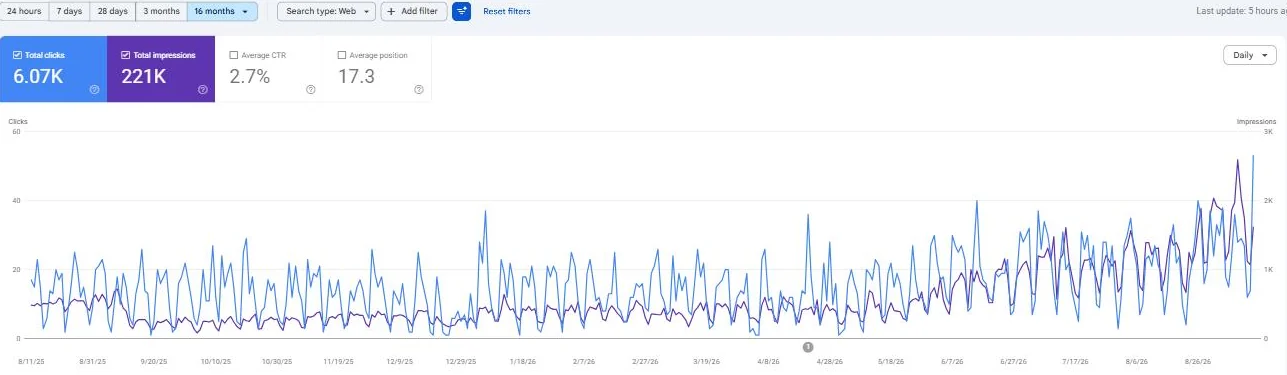
Monthly Google clicks up 3 times in thirteen months
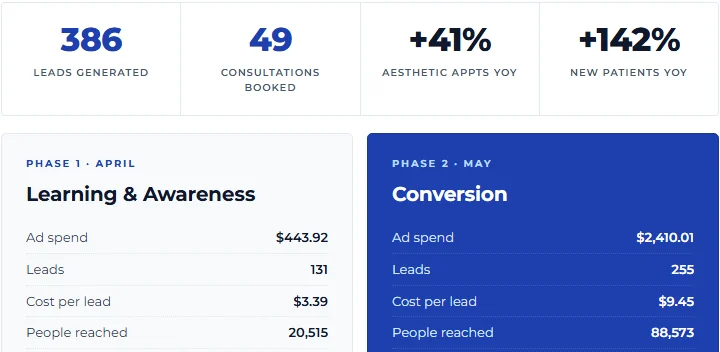
Leads per month nearly doubled while cost per lead fell by a third
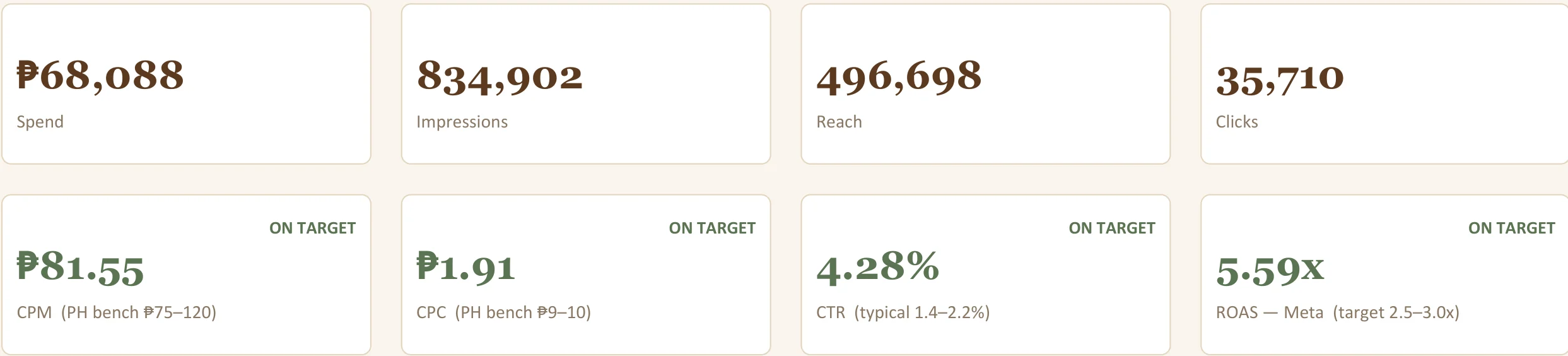
Monthly store sales grew from ₱193K to ₱1.31M
How we wrote this guide
We reviewed the service scope and trade-offs from our hands-on work. Our guides explain costs, limitations, and what to ask before choosing a provider. See our process.
About the author
Tim Alcantara
Tim Alcantara is a Digital Marketing Consultant at BX Digital Marketing, a Taguig-based agency that runs SEO, Google Ads and Meta Ads for clients in the Philippines, Australia, the United States, Canada, the United Kingdom and Singapore.
Learn more about BX